Sell directly from WhatsApp chat
Turn your WhatsApp into a storefront. This allows customers browse your products, ask questions, and place orders — all without leaving the chat. No website or app required.
Free to set up • No website required
Your products only one tap away
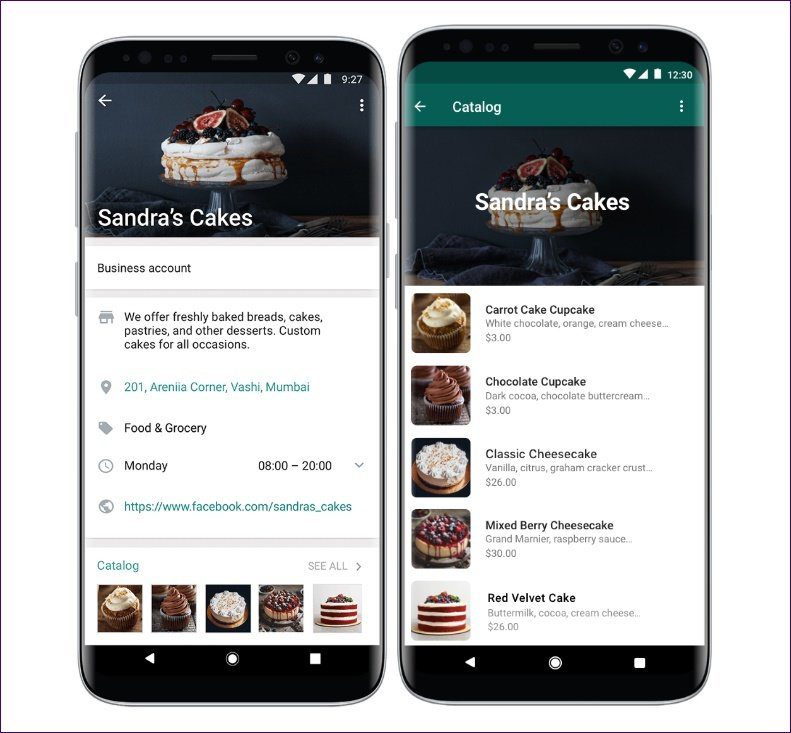
Every customer who messages you already has your product catalog in their hands. WhatsApp Catalog turns your chat into a browsable storefront and can show photos, prices, and descriptions for every item you sell, right inside the conversation. No seperate app download, no separate login, no website required. They tap on the chat, they ask, they buy.Basically a business that occurs between two people online and without a need for a website which serves as an easy method of business for merchants with zero to little technical know how.
Features
- Product catalog — Up to 500 products allowed to be displayed , each with its own image, price, and description.
- Shareable catalog link — One link works everywhere: bio, QR code, ads, status etc all redirect to your product catalogue.
- In-chat ordering — Customers message you directly from a product listing and all inquiry, discussion and payment occurs in a single chat.
- Quick replies & greetings — You have the option to make the sale without even being present as WhatsApp Business allows you to auto-respond to common questions while you're away.
- Collections — Group products into categories like "New Arrivals" or "Best Sellers" so customers browse instead of scrolling one long list.
- Business profile — Show your address, hours, website, and description right alongside your catalog, so customers get full context before they message.
How it works
- Switch to WhatsApp Business — Convert your account into WhatsApp Business which will give you access to the Buisness features and display your account name as a "business account".
- Complete your business profile — Add your name, category, description, address, and hours so customers get full context the moment they message you.
- Add your products — Add every item you sell with a clear photo, price, and short description. You can list up to 500 products in your catalog.
- Organize into collections — Group items into folders like "New Arrivals" or "Best Sellers" so customers can browse faster instead of scrolling everything.
- Set up quick replies & greetings — Save answers to common questions and set an auto-greeting so new chats get an instant response.
- Share your catalog link — Share your catalog link on your WhatsApp status, with loyal customers, on social media, or through a website growth tool like Vyaparify.
- Take orders in chat — Customers browse, ask questions, and confirm — you send a payment link or UPI request to close the sale.
- Close the sale — Confirm payment, focus on delivery or fulfillment, and label the chat so you can follow up on repeat orders.
Built for
- Retailers & boutiques — Shops that have dozens of SKUs and no time to build a website can photograph their inventory once and let customers browse sizes, colors, and new arrivals right in the chat.
- Home-based sellers — Bakers, tailors, and D2C sellers running a business from home, without the cost of a physical shop or online store can take custom orders and share their menu or collection from the same phone or any other device already in use. They should have proper pictures ready and price explanations aswell.
- Wholesalers — Suppliers managing repeated B2B buyers can send their full product line in seconds, update prices or stock instantly, and keep every order conversation in one place instead of scattered emails and PDFs
- Service providers — Salons, consultants, and repair services selling packages or tiers can show customers pricing upfront and can allow follow-up questions before committing, no back-and-forth over calls.
Why sellers switch to Catalog + Chat
- Zero friction for the customer — Customers are already on WhatsApp and since browsing and ordering happens in the same app, the same conversation leads to the buying and payement process after consumer can (since they are in chat) browse and finalise product/s.
- No website required — Skip the cost and hassle required for building an online website to showcase your store. Your catalog is able to go live within a day of signing up and includes price and images quite easily.
- Personal, not automated — Every order still runs through a real chat, so you can upsell, answer questions, and build trust.
- Free to use — WhatsApp Catalog is a built-in feature of WhatsApp Business, at no extra cost and can be used without spending a dime.
Frequently asked questions
Do customers pay inside WhatsApp?
No customers browse and message you, but checkout happens outside the chat (UPI link, payment link, or cash/COD). You confirm and send the payment request.
How many products can I list?
Up to 500 products in one catalog, one catalog per WhatsApp Business account.
Do I need a website?
No. The catalog and chat replace the need for a website entirely, though you can still link one if you have it.
Can I send multiple products in one message?
Yes, with WhatsApp Business API you can send Multi-Product Messages showing up to 30 items at once otherwise customers browse your catalog and message you per item.
Why isn't my catalog showing up to customers?
Usually one of three things: your business profile is incomplete, the app needs an update, or a product image is stuck in review. Check that your business profile (name, category, description) is fully filled in first.
Can I sync my catalog with an online store I already have?
Yes, if you're on the WhatsApp Business API/Platform — you can connect it to platforms like Shopify or WooCommerce so your catalog updates automatically instead of manual entry.
What image size does WhatsApp accept for product photos?
Between 500KB and 5MB. Images outside that range often fail to upload or get rejected.
Can I hide out-of-stock items automatically?
You can mark items as unavailable within the catalog, but nothing removes them automatically — you'll need to update stock status manually unless synced via API to an inventory system.
Ready to sell from your chat?
Set up your catalog in minutes no website, no code.