Set up your Google Business Profile The Right Way
A step-by-step walkthrough for getting verified and visible on Google Search and Maps plus the mistakes that quietly tank your ranking from the search.
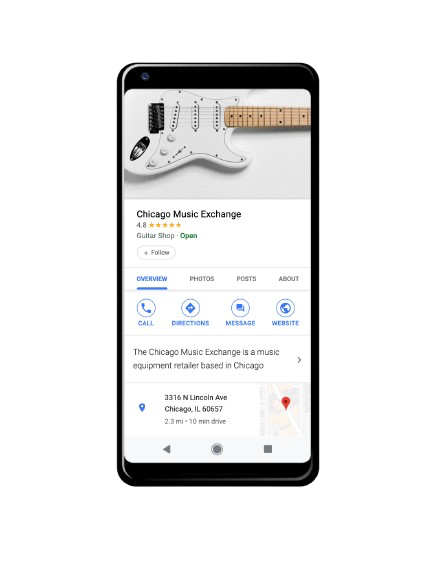
Free to set up • No website required
Why a Google Business Profile matters
When someone searches for a business like yours nearby, your Google Business Profile is what shows up in the map and inside directions to your business before anyone visits a website. For most small businesses it's the single highest-leverage, zero-cost thing you can do for local visibility and makes you seem official and verified(provided you put in the work setting up the profile). But such a powerful tool for many types of businesses is often misunderstood, misused or simple ignored hence why this exists as a reminder of its strength.
Google Business Profile Features
The main and important features within GMB that require constant watch and frequent updates to preserve an increased consistent flow.
- Photos — . Photos are two way mirrors to show what your business looks like and what it does. Real time clicked photos increase trust and traffic to your business grows as your identity strengthens.
- Posts — Provide updates when required to consumers or loyalty customers which is able to give them information about whether or not they should visit your business.
- Reviews — Reviews are valuable input to business owners as they provide rooms for improvement, strengths to polish and even suggestions. Businesses should regularly respond to these reviews to build bridges and maintain an identity.
- Q&A — Customers or potential consumers will have doubts about your business no matter how polished you are. These questions can come through any form such as phone, email or social media or Google so make sure to answer them before they pivot to an alternative.
The Step by Step process of setting up GMB
- Create or claim your profile — Go to google.com/business, sign in, search your business name first and if it pops up claim it to avoid duplicates.
- Add your business details — Enter your official details such as exact name, category, address or service area, phone, website etc.
- Verify your business — Video verification is now the default for most new profiles in 2026 (~5 business days); postcard (5–14 days) and instant verification via Search Console are also options. But once verified it shows your business is yours only.
- Complete your profile — Input photos for every category, enter the correct working hours, services and put a short but insightful description.
- Follow up regularly — Keep updating and postings follow ups to ensure regularity and communication with customers.
Commonly made Mistakes
Frequent & normal mistakes that businesses make while setting up their GMB and their online presence.
- Inconsistent NAP across the web — Having different Names, Addresses and Phone Numbers makes it tricky for consumer to contact or locate business.
- Choosing a vague or wrong category — Selecting a wrong category will essentially remove you from the eyes of the prospects and generate zero traffic. Make sure you are aligned with what category your business fits into.
- Leaving service areas incomplete — Not including everything your business does makes a small part of your services invisible to customers. Ensure all services and offerings are accounted for when listing what services ur company provides.
- Incorrect Working Hours — Not keeping the correct working hours can provide inconvenience to customers and you can lose out on them.
- Ignoring reviews & queries — Ignoring any consumer feedback and query will give the message that your business doesnt believe in 2 way contacts and can lose consumers.
Listed on Google vs. Invisible Everywhere
Without Vyaparify
- Invisible in the map pack — Customers searching "near me" never see you show up alongside listed competitors
- No control over your listing — Google auto-generates a shell profile from directories and phone books — with wrong hours and no photos if nothing is inputed.
- No proof of trust — No reviews, ratings, or Q&A for customers to check before choosing where to go
With Vyaparify
- Featured in the map pack — Appear in local search and Maps results with hours, photos, directions, and calls
- You control every detail — Correct hours, categories, photos, services, and offers all managed by you
- Reviews build trust automatically — Star ratings and review responses shown directly in search results
Frequently asked questions
How long does verification take?
Depends on method used: video takes 5 business days, postcard 5–14 days, instant if your site's already linked to Search Console.
Do I require a physical storefront?
No, service-area businesses can list without a public address so a physical store location isnt necessary.
What if a profile already exists?
Search before creating one; claim it instead and even your verification isnt needed also duplicates get suspended.
Is it free?
Yes, creating and managing the profile costs nothing but a few minutes of time.
Can I add more than one location to my profile?
Yes — each physical location needs to be created and verified independently, even if they're all the same business. Google treats a single-brand chain differently from separate businesses sharing an owner, so don't try to combine locations under one listing.
How do customers ask questions about my business now?
As of March 2026, Google replaced the old public Q&A threads with "Ask about this place" (part of Ask Maps) customers type a natural-language question and Google's AI answers it using your profile info, reviews, and website. This is another reason a complete, accurate profile matters: it's now the source material the AI pulls from.
Get found on Google without the guesswork
Vyaparify gives you one page that covers everything Google checks for: accurate details, photos, and a way for customers to reach you instantly